Islamic Support
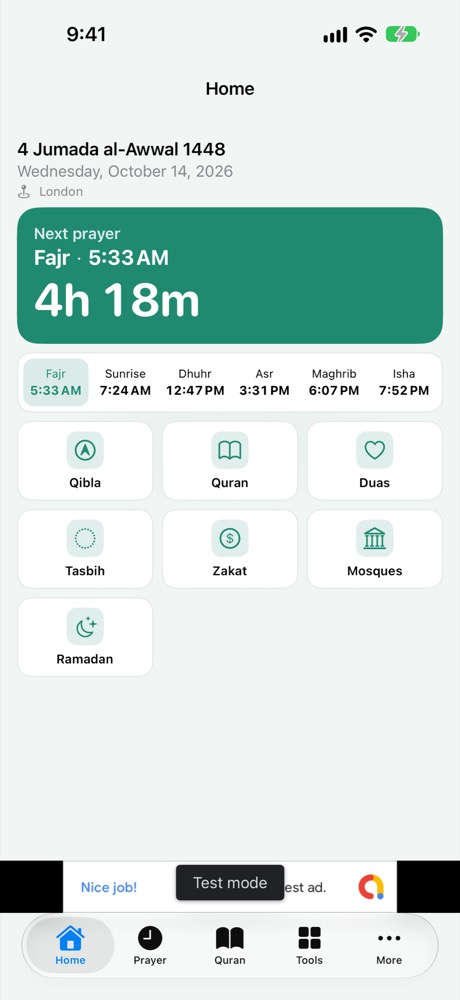
Prayer times, Qibla, Quran, Ramadan and tools on iPhone, iPad, and Android. No account required.
Contact
Email: ali@yoraba.com
We aim to respond within 2 business days.
Getting started
Open the app on Home to see the next prayer and shortcuts. Use the tabs for Prayer, Quran, Tools, and More (Settings, Tip Jar, and extras).
Frequently Asked Questions
Prayer times look off by a few minutes
Open More → Settings and try another calculation method (for example Umm al-Qura or Moonsighting Committee) or the Hanafi Asr rule, or add a minute adjustment per prayer. Check your place and time zone.
Do I have to share my location?
No. Search for a city instead. Location is used only on your device to work out times and Qibla; it is not sent to us.
Notifications or the Azan do not play
Turn notifications on in More → Settings → Notifications and allow them in system settings. On iPhone the Azan follows the silent switch and Focus. On Android allow exact alarms and exclude the app from battery optimisation.
The Qibla compass jumps or drifts
Hold the phone upright, move away from metal, wave in a slow figure‑8, then tap Calibrate compass in the Qibla tool and turn slowly until the Kaaba icon sits under the arrow at the top. If there is no compass sensor, use the slider or map view.
The Hijri date is a day off
Moon sighting differs by region. Adjust the date by one or two days in the Hijri Calendar settings.
What are Hajj Travel, Umrah Travel and Janazah?
Checklists for documents, packing and arrangements. They do not give rulings or teach the rites; please consult a qualified scholar for religious guidance.
How do ads and privacy choices work?
Free users may see small banner ads on Home, Prayer, Tools, and More, not in the Quran or inside tools. Where required, Google shows a consent message before ads; on iPhone you may see Apple's tracking prompt. When available, reopen choices from Settings → Ad privacy choices. Any Tip Jar tip removes ads.
How do I remove ads or restore a purchase?
Open More → Tip Jar. Any tip removes ads. Use Restore purchases on a new device with the same Apple ID or Google account. For billing issues, contact Apple Support or Google Play Support.
Where does my data go?
Nowhere on our servers. It stays on your device. Mosque and city search send queries to Apple Maps or OpenStreetMap as described in the privacy policy.
Which devices are supported?
iPhone and iPad on iOS 17 or later; Android phones and tablets on Android 8.0 or later. English UI with RTL-ready layout. Light and dark mode follow your system setting.
Privacy
Read our Privacy Policy, or return to the app page.
© 2026 Yoraba